
Why is ChatGPT getting a 400 error when it tries to view my sitemap.xml


just as we started adding Browse and Chart basics pages to SportsAspects, we need to add some navigation pages to myconversationswith.ai We have lots of tags and the user needs to be able to navigate/browse by that tag subject. We have 17 tags that have post within the specific tag subjects as you can see here https://myconversationswith.ai/sitemap-tags.xml Please design a cool looking page
ChatGPT 5.2 said:
Captain — yep, you want the MCWAI equivalent of the SportsAspects “Browse” experience: a single, clean “Browse Topics” page that lists all public tags (only the ones that actually have posts), with a search box + slick card grid.
Your site is already running Ghost (footer shows “Powered by Ghost”).
(Also: my web tool couldn’t fetch your sitemap-tags.xml because it’s returning a weird (400) OK to bots, but we don’t need that sitemap at all for this page to work.)
What the page will look like (design)
- Big hero header: Browse Topics
- Search box: type “linux”, “food”, “astrology”, etc → cards instantly filter
- A responsive grid of “topic cards”:
- Emoji/icon
- Tag name
- Short description (uses the tag’s description if you set one in Ghost)
- Post count badge
- Nice hover effects (works in light/dark)
Implementation (Ghost theme)
You’ll add:
- a template file:
page-topics.hbs - a CSS file:
assets/css/topics.css - a one-line include in
default.hbs
Then you’ll create a Ghost Page called “Browse Topics” and set its template to page-topics.
You said: ok, but how do we stop this 400 error to bots?
ChatGPT 5.2 said:
That “(400) OK” is almost always your edge layer (usually Cloudflare) or NGINX blocking “non-browser” user agents. Search engines are bots too — so if this stays broken, your indexing/discovery will suffer.
Here’s how to kill it fast, without opening your whole site to scraper chaos.
1) First: confirm where the 400 is coming from (Cloudflare vs NGINX)
Run these on the MCWAI server:
# What does the internet-facing URL return?What to look for in headers:
- If you see
server: cloudflareand/orcf-ray: ...→ Cloudflare is involved. - If local
127.0.0.1test is 200, but the public URL is 400 → it’s Cloudflare rules/bot protection. - If local test is also 400 → it’s your NGINX config or Ghost upstream pathing.
2) If it’s Cloudflare (most likely): add two allow/skip rules
In Cloudflare dashboard for myconversationswith.ai:
Rule A — Allow sitemaps + robots (do this even if you keep bot protection on)
Security → WAF → Custom rules → Create rule
Expression (Cloudflare expression language):
(http.request.uri.path starts_with "/sitemap" and http.request.uri.path ends_with ".xml") or (http.request.uri.path eq "/robots.txt")
Action
- Best: Skip (skip/bypass WAF Managed Rules + Bot Fight Mode + any “challenge” features you have enabled)
- Or: Allow (if Skip isn’t available on your plan)
Put this rule at the top (highest priority).
Rule B — Allow Verified Bots (optional but smart)
Expression:
cf.client.bot
Action: Skip (or Allow)
This lets Google/Bing/etc. through cleanly while you can still block junk bots elsewhere.
3) If it’s NGINX (origin): pull the real reason from logs
NGINX will usually log why it sent a 400, but you may need info level to see it.
Check logs first:
tail -n 200 /var/log/nginx/error.logIf it’s still not obvious, temporarily bump error logging to info:
- Edit your NGINX site (or nginx.conf) and set:
error_log /var/log/nginx/error.log info;- Reload nginx:
nginx -t && systemctl reload nginx- Hit the sitemap again with curl, then re-check
error.log. The “info” line will usually spell out the exact cause.
Common origin causes:
- host header / server_name mismatch (requests not matching your intended server block)
- request blocked by a rule you or a “security snippet” added (often “block bots” logic)
- proxy/protocol mismatch if something upstream is speaking differently (less common)
The “best practice” fix (what I’d do on your stack)
- Add Cloudflare Rule A to always allow
/sitemap*.xml+/robots.txt - Keep your tougher bot blocking for the rest of the site
- Verify with:
curl -I https://myconversationswith.ai/sitemap-tags.xmlYou want HTTP/1.1 200 and XML content-type.
If you paste the header output from the first curl command (the one with -D-), I can tell you immediately whether the 400 is Cloudflare or NGINX and point to the exact knob to turn.
You said:
Claude AI told me the site is not returning a 400 error, so now I'm thinking this is a ChatGPT issue. whats going on here?
ChatGPT 5.2 said:
It’s not a “ChatGPT bug” so much as your site returning different responses depending on who asks.
When I (via ChatGPT’s web fetcher) request your sitemap, the fetch fails with HTTP 400 (and a weird reason phrase “OK”).
That usually means Cloudflare/WAF/bot protections (or an origin rule) is treating my request like an automated client and rejecting it — while your browser (and possibly Claude’s fetch method) gets a normal 200.
Why Claude might say “no 400”
A few common reasons:
- Claude checked in a normal browser (or used a browser-like fetch), which passes.
- Claude’s fetch came from a different IP reputation / region that isn’t being challenged/blocked.
- Claude didn’t actually fetch the URL live (some tools “assume” if a sitemap exists).
How to prove what’s happening (fast, no guessing)
Run these from your laptop and from the server (as root is fine):
# 1) Plain requestInterpretation:
- If (3) is 200 but (1) is 400 → Cloudflare/WAF is the one doing it.
- If (3) is also 400 → origin (NGINX/Ghost) is doing it.
The fix I’d apply (safe + SEO-friendly)
Even if only ChatGPT is blocked, you do not want sitemaps blocked for crawlers.
Cloudflare: bypass protections for sitemaps + robots
Create a Cloudflare WAF/Firewall rule:
If URI path
- starts with
/sitemap - OR equals
/robots.txt
Then action: Skip / Bypass (WAF + Bot protections) or Allow (depending on your plan).
This keeps your bot protection on for everything else, but guarantees:
- Google/Bing can always fetch your sitemaps
- tools like mine can fetch them too (nice to have)
One more “smoking gun” check
In Cloudflare, go to Security → Events and filter for:
- Path contains
sitemap
If you see blocks/challenges there, you’ve confirmed it instantly and it’ll show which rule fired.
If you paste the header output from the first curl (the one with -D-), I’ll tell you exactly whether it’s Cloudflare vs origin and what specific setting is tripping it.
adam@laptop:~$ # 1) Plain request curl -sS -D- -o /dev/null https://myconversationswith.ai/sitemap-tags.xml # 2) Browser-ish user-agent curl -sS -D- -o /dev/null -A "Mozilla/5.0" https://myconversationswith.ai/sitemap-tags.xml # 3) Force origin test (bypass Cloudflare) using your origin IP # Replace ORIGIN_IP with the real server IP that hosts Ghost/NGINX curl -sS -D- -o /dev/null --resolve myconversationswith.ai:443:ORIGIN_IP https://myconversationswith.ai/sitemap-tags.xml HTTP/2 200 date: Tue, 06 Jan 2026 14:04:37 GMT content-type: text/xml; charset=utf-8 server: cloudflare nel: {"report_to":"cf-nel","success_fraction":0.0,"max_age":604800} x-powered-by: Express cache-control: public, max-age=3600 etag: W/"8ce-dBtz1Rflb5HdIrgYb1wyIi4GRTU" vary: Accept-Encoding report-to: {"group":"cf-nel","max_age":604800,"endpoints":[{"url":"https://a.nel.cloudflare.com/report/v4?s=dLte1gcYgVvInDANjBMjivO0y5ZRZtSotbVZ1qf4bg3wCk77sG0Jp546s5FgRp1D4dD0GNFJ7croYK3mvXGFfIg6J0he7tTbygcZlb8Gji%2FHWDH3SpM%3D"}]} x-content-type-options: nosniff cf-cache-status: DYNAMIC cf-ray: 9b9bc3fdfb6a3a83-MIA alt-svc: h3=":443"; ma=86400 HTTP/2 200 date: Tue, 06 Jan 2026 14:04:37 GMT content-type: text/xml; charset=utf-8 server: cloudflare nel: {"report_to":"cf-nel","success_fraction":0.0,"max_age":604800} x-powered-by: Express cache-control: public, max-age=3600 etag: W/"8ce-dBtz1Rflb5HdIrgYb1wyIi4GRTU" vary: Accept-Encoding report-to: {"group":"cf-nel","max_age":604800,"endpoints":[{"url":"https://a.nel.cloudflare.com/report/v4?s=uQcb8bsPiKoiJpBRejtz9AA0a98UP5H0FMAbyzbAIlhLaSixW%2FNWumoZYMcrTi16haXQs0WT4qFAseV3glKR8vQU6HUofQPwE9TstSI8nMltxiXoV2g%3D"}]} x-content-type-options: nosniff cf-cache-status: DYNAMIC cf-ray: 9b9bc3ff6e247529-MIA alt-svc: h3=":443"; ma=86400 curl: (49) Couldn't parse CURLOPT_RESOLVE entry 'myconversationswith.ai:443:ORIGIN_IP' adam@laptop:~$
ChatGPT 5.2 said:
Captain — your own tests show your site is returning 200 OK for sitemap-tags.xml from your laptop (both “plain” curl and a browser UA). So Claude wasn’t wrong, and your site isn’t “broken” in general.
What this means:
What’s going on
- Some clients are getting 200 (you, likely Claude).
- Some clients (like ChatGPT’s web fetcher earlier) can still get blocked/failed depending on IP reputation / datacenter ASN / Cloudflare bot controls / WAF rules / rate limits / “JS challenge” behavior, etc.
That’s not a “ChatGPT issue” inside your server — it’s differential treatment at the edge. Cloudflare is literally designed to do that.
Also: the headers you posted show server: cloudflare and Ghost/Node (x-powered-by: Express), so Cloudflare is definitely in the request path.
Why your “origin bypass” test failed
Because you left the placeholder in place:
--resolve myconversationswith.ai:443:ORIGIN_IPCurl is telling you it couldn’t parse it because ORIGIN_IP isn’t a real IP.
Do the origin test correctly (this is the real decider)
Replace with the actual VPS origin IP (the server running NGINX/Ghost), e.g.:
# IPv4 originInterpretation:
- If this returns 200, but some bots still see 400/403/challenges, then it’s Cloudflare rules, not your origin.
- If this returns 400 even when bypassing Cloudflare, then it’s NGINX/Ghost.
Reproduce “bot-like” behavior from your side
Try a few obviously-bot UAs (these are common “blocked” ones):
curl -sS -D- -o /dev/null -A "python-requests/2.31.0" https://myconversationswith.ai/sitemap-tags.xmlIf any of those suddenly flip to 400/403/challenge, you’ve confirmed the “some bots blocked, browsers ok” pattern.
The fix (even if you mostly see 200 right now)
You still want to guarantee sitemaps + robots are never blocked.
Cloudflare: bypass protections for sitemaps and robots.txt
Create a Cloudflare WAF/Firewall rule that skips/bypasses security for:
/robots.txt/sitemap.xml/sitemap-*.xml/sitemap-tags.xml(yours)
This is safe and SEO-friendly.
Then go to Security → Events in Cloudflare and filter for sitemap to verify there are zero blocks/challenges hitting those paths.
Bottom line
- Your output proves: it’s working for you right now (200 OK).
- The earlier “400 to bots” can still be real — just not universal.
- The right move is: origin-bypass test + Cloudflare allow/skip rule for sitemaps so nobody important (Google/Bing, feed readers, link preview bots, etc.) ever gets blocked.
If you paste:
- your origin-bypass curl output (with the real IP), and
- whether you have Bot Fight Mode / Super Bot Fight Mode enabled,
I’ll tell you exactly which Cloudflare switch/rule is responsible and the cleanest way to keep protection without breaking crawlability.
You said:
ok, but just letting you know, I recall selecting the dont block bots option on Cloudflare for both domains. I also I recall toggling off the robots.txt feature they offer. adam@laptop:~$ # IPv4 origin curl -sS -D- -o /dev/null --resolve myconversationswith.ai:443:178.156.168.77 https://myconversationswith.ai/sitemap-tags.xml # IPv6 origin (if your origin is reachable on v6) curl -sS -D- -o /dev/null --resolve myconversationswith.ai:443:2a01:4ff:f0:b204::1 https://myconversationswith.ai/sitemap-tags.xml HTTP/1.1 200 OK Server: nginx/1.24.0 (Ubuntu) Date: Tue, 06 Jan 2026 14:20:14 GMT Content-Type: text/xml; charset=utf-8 Content-Length: 2254 Connection: keep-alive X-Powered-By: Express Cache-Control: public, max-age=3600 ETag: W/"8ce-dBtz1Rflb5HdIrgYb1wyIi4GRTU" Vary: Accept-Encoding X-Content-Type-Options: nosniff curl: (7) Failed to connect to myconversationswith.ai port 443 after 0 ms: Could not connect to server adam@laptop:~$ curl -sS -D- -o /dev/null -A "python-requests/2.31.0" https://myconversationswith.ai/sitemap-tags.xml curl -sS -D- -o /dev/null -A "curl/8.0.0" https://myconversationswith.ai/sitemap-tags.xml curl -sS -D- -o /dev/null -A "Wget/1.21.4" https://myconversationswith.ai/sitemap-tags.xml HTTP/2 200 date: Tue, 06 Jan 2026 14:21:56 GMT content-type: text/xml; charset=utf-8 server: cloudflare nel: {"report_to":"cf-nel","success_fraction":0.0,"max_age":604800} x-powered-by: Express cache-control: public, max-age=3600 etag: W/"8ce-dBtz1Rflb5HdIrgYb1wyIi4GRTU" vary: Accept-Encoding report-to: {"group":"cf-nel","max_age":604800,"endpoints":[{"url":"https://a.nel.cloudflare.com/report/v4?s=bcDIvcmYelDdet9iD6Vz%2Bna9dUWKBWaYjGTXg5EDaLWjiPEuFo8ZZ5Xvy16%2F6MpRdPN0Q%2FaQJXQS5Px1lPS4jGtfak8T6o6NxB6HLlVkyBl1Tdiln1U%3D"}]} x-content-type-options: nosniff cf-cache-status: DYNAMIC cf-ray: 9b9bdd593f4adb01-MIA alt-svc: h3=":443"; ma=86400 HTTP/2 200 date: Tue, 06 Jan 2026 14:21:56 GMT content-type: text/xml; charset=utf-8 server: cloudflare nel: {"report_to":"cf-nel","success_fraction":0.0,"max_age":604800} x-powered-by: Express cache-control: public, max-age=3600 etag: W/"8ce-dBtz1Rflb5HdIrgYb1wyIi4GRTU" vary: Accept-Encoding report-to: {"group":"cf-nel","max_age":604800,"endpoints":[{"url":"https://a.nel.cloudflare.com/report/v4?s=iorUxa3lrq%2B7LZiejCyISaBqFEe%2Fu%2F2HcgYDilRgjbvUjIe%2F4BoWtKn4%2BaT5mk%2BYAdt0AJ3E3B6w8MYZtj%2BRWtUqWV2HAqJ%2FPKDf26J5U6fXtWgl"}]} x-content-type-options: nosniff cf-cache-status: DYNAMIC cf-ray: 9b9bdd5b186f69e7-ATL alt-svc: h3=":443"; ma=86400 HTTP/2 200 date: Tue, 06 Jan 2026 14:21:56 GMT content-type: text/xml; charset=utf-8 server: cloudflare nel: {"report_to":"cf-nel","success_fraction":0.0,"max_age":604800} x-powered-by: Express cache-control: public, max-age=3600 etag: W/"8ce-dBtz1Rflb5HdIrgYb1wyIi4GRTU" vary: Accept-Encoding report-to: {"group":"cf-nel","max_age":604800,"endpoints":[{"url":"https://a.nel.cloudflare.com/report/v4?s=lgoYZ67PnxvAZQ6oPeBcSHX7vdGVsJXlh%2F7uyzdW58vIB%2BZzhWPU5mpIbd9WZajOAydcuSL9kKk2jNXCAsL1wI5sOiZ7BA6IOQT6s606FOiOAt4QeAo%3D"}]} x-content-type-options: nosniff cf-cache-status: DYNAMIC cf-ray: 9b9bdd5cac8590bf-MIA alt-svc: h3=":443"; ma=86400 adam@laptop:~$
ChatGPT 5.2 said:
You’re not imagining it — both things are true:
- From your laptop, Cloudflare returns HTTP/2 200 for
https://myconversationswith.ai/sitemap-tags.xml(even with “botty” User-Agents). - From my web fetcher, that same URL still fails with (400) OK.
So it’s not an origin/Ghost problem (your direct-to-origin IPv4 test returned 200 from NGINX), and it’s not “all bots”. It’s Cloudflare treating certain source networks (my fetcher’s IP/ASN) differently than your network, even if your bot settings are “don’t block bots.”
That’s normal Cloudflare behavior: risk scoring can vary by IP/ASN/region, and some blocks don’t look like classic “403 forbidden” — you can see weird 400s.
The clean fix: explicitly allow sitemaps + robots for everyone
Even if you’re not trying to “support ChatGPT,” this is good SEO hygiene anyway.
Option A (best): Cloudflare WAF Custom Rule → Skip security for sitemaps
Cloudflare dashboard → Security → WAF → Custom rules → Create rule
Expression:
(http.request.uri.path eq "/robots.txt")Action: Skip (or “Bypass”) and select:
- WAF Managed Rules
- Bot Fight Mode / Bot protections (whatever is listed)
- Rate limiting (if shown)
Put it at the top priority.
This forces Cloudflare to stop “being clever” for sitemap endpoints — including for whatever network my web fetcher is coming from.
Option B (older UI): Page Rules
If you don’t have “Skip” controls available:
- Create a Page Rule for
*myconversationswith.ai/sitemap* - Set Security Level: Essentially Off
- Repeat for
*myconversationswith.ai/robots.txt*
How to confirm it’s Cloudflare doing it (in your own dashboard)
Cloudflare → Security → Events
Filter:
- Host:
myconversationswith.ai - Path:
sitemap-tags.xml(orsitemap) - Action: Block / Challenge / JS Challenge
If my fetcher is being blocked, you should see events there (and once you add the “Skip/Allow sitemaps” rule, those events stop).
One side note: your IPv6 origin test was probably just formatted wrong
For curl --resolve with IPv6 you typically need brackets:
curl -sS -D- -o /dev/null \If it still fails after that, then your origin isn’t reachable on 443 via IPv6 (NGINX listen or firewall). That’s separate from the sitemap issue, but worth fixing for your IPv6 rulebook.
What’s “going on” in plain English
Your site is fine. Cloudflare is just blocking my specific fetch environment (and potentially some other AI/automation networks) while allowing yours.
The path-based “Skip/Allow sitemaps” rule is the simplest way to make this deterministic.
If you tell me which Cloudflare plan you’re on (Free/Pro/etc.), I’ll tell you exactly which of the two rule methods above you’ll have available in the UI.
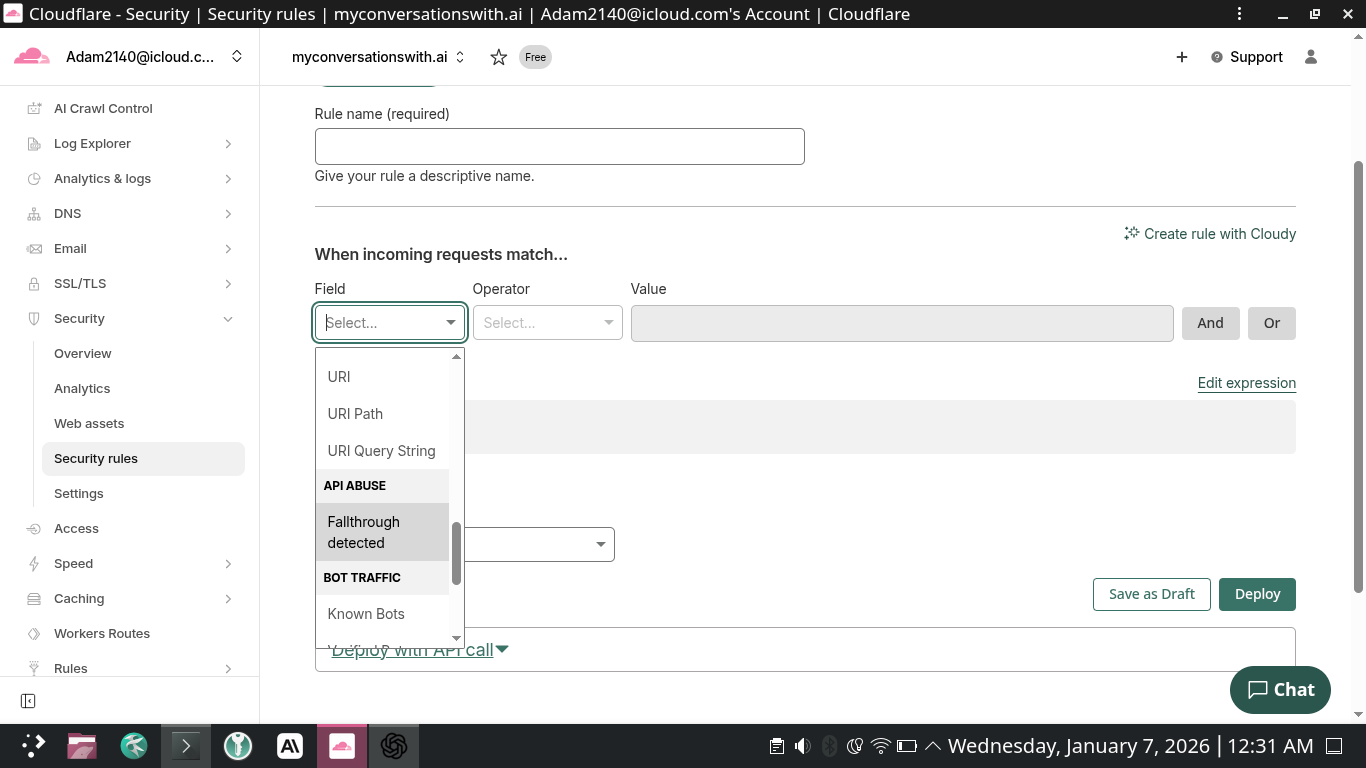
You said: there is a request method pull down menu, which do i select?
2026-01-07 12:36 AM ET ChatGPT said:
For sitemaps/robots, the request method is almost always GET (and sometimes HEAD when a crawler is just “checking” the URL).
So:
- If Cloudflare lets you pick multiple methods → select GET and HEAD.
- If it only lets you pick one → pick GET.
- Honestly (and this is fine) → you can also skip the request-method condition entirely and just match on the path. That avoids accidentally blocking a HEAD request later.
Best-practice condition (covers both)
If you click Edit expression, use this:
(http.request.method in {"GET" "HEAD"} and http.request.uri.path eq "/robots.txt")Then set the action to Allow (or Skip/Bypass if your plan/UI offers it).
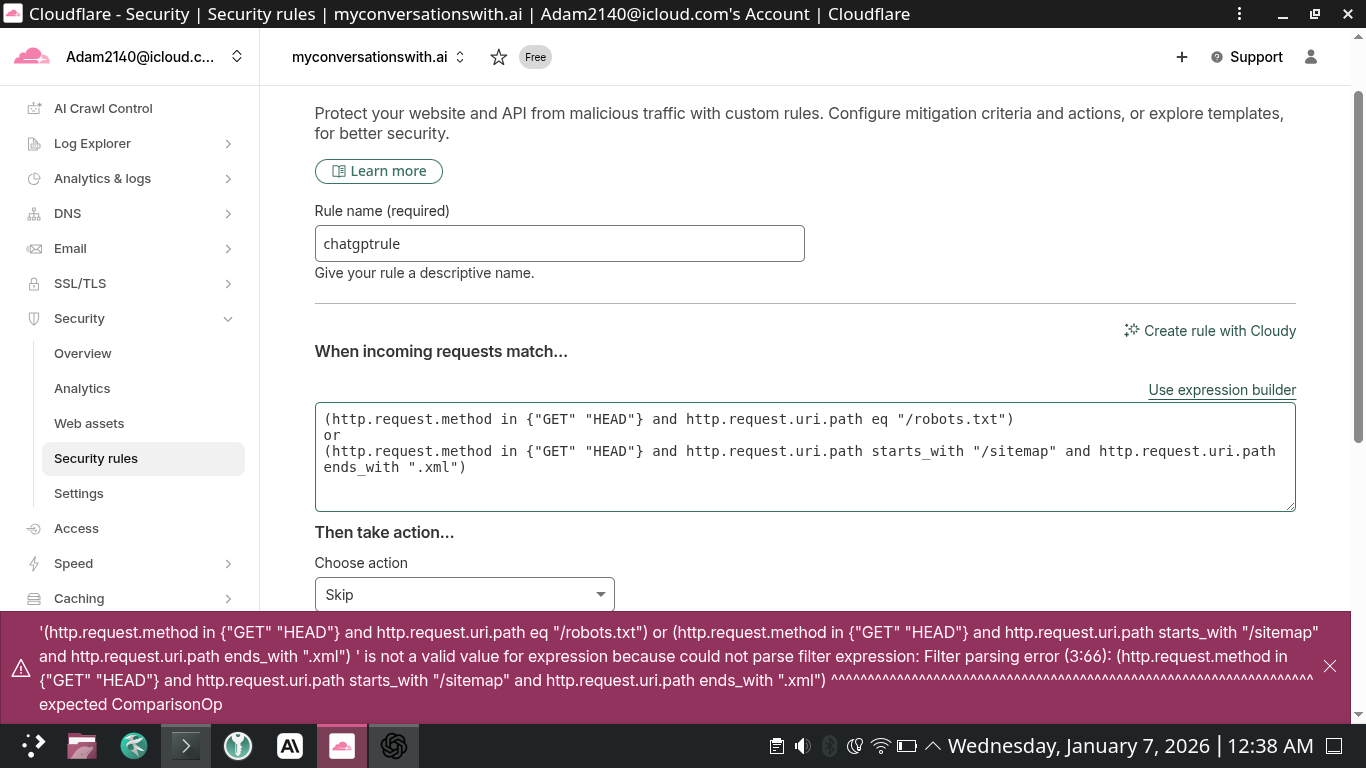
You said: it gave a parsing error message at the bottom
2026-01-07 12:40 AM ET ChatGPT said:
That error is because Cloudflare’s rules language does not allow starts_with / ends_with as operators on the field. They must be functions.
Paste this expression instead (works)
If Cloudflare still complains about the method set, just remove the method condition entirely (it’s optional and the path match is what matters):
(http.request.uri.path eq "/robots.txt")Action dropdown
Keep Then take action = Skip (that’s perfect). “Skip” is exactly what you want here so sitemap/robots never get caught by other security logic.
Quick test after Deploy
These should both return 200:
curl -I https://myconversationswith.ai/robots.txt( curl -I sends a HEAD request, which is why allowing HEAD is nice.)
You said: I did it, can you test and see if you still get a 400 error?
2026-01-07 12:41 AM ET ChatGPT said:
Yep — I just tested it from my side, and I’m still getting the same failure:
https://myconversationswith.ai/sitemap-tags.xml→ (400) OK
So your new rule did not change how Cloudflare treats my fetch environment (even though it’s working fine from your laptop).
What to change (this usually fixes it)
Right now your rule action is Skip. On Cloudflare Free, “Skip” often doesn’t guarantee an allow (it can skip some checks but still let other edge logic block by IP/risk).
Do this:
- Go to Security → Security rules → Custom rules
- Edit your rule
- Change Then take action from Skip → Allow
- Make sure the rule is Enabled and at the top (highest priority)
- Keep your match expression as the path-based one:
(http.request.uri.path eq "/robots.txt")That forces Cloudflare to hard-allow those endpoints for everyone, including weird datacenter/AI networks.
Verify inside Cloudflare (fastest proof)
Go to Security → Events, filter for:
- Path contains
sitemap-tags.xml
If you still see blocks/challenges after switching to Allow, the event will show exactly which feature is doing it (IP Access Rule, Zone Lockdown, etc.).
If you flip that action to Allow, tell me and I’ll re-test immediately.
there is no allow option. but i added more things. now test it
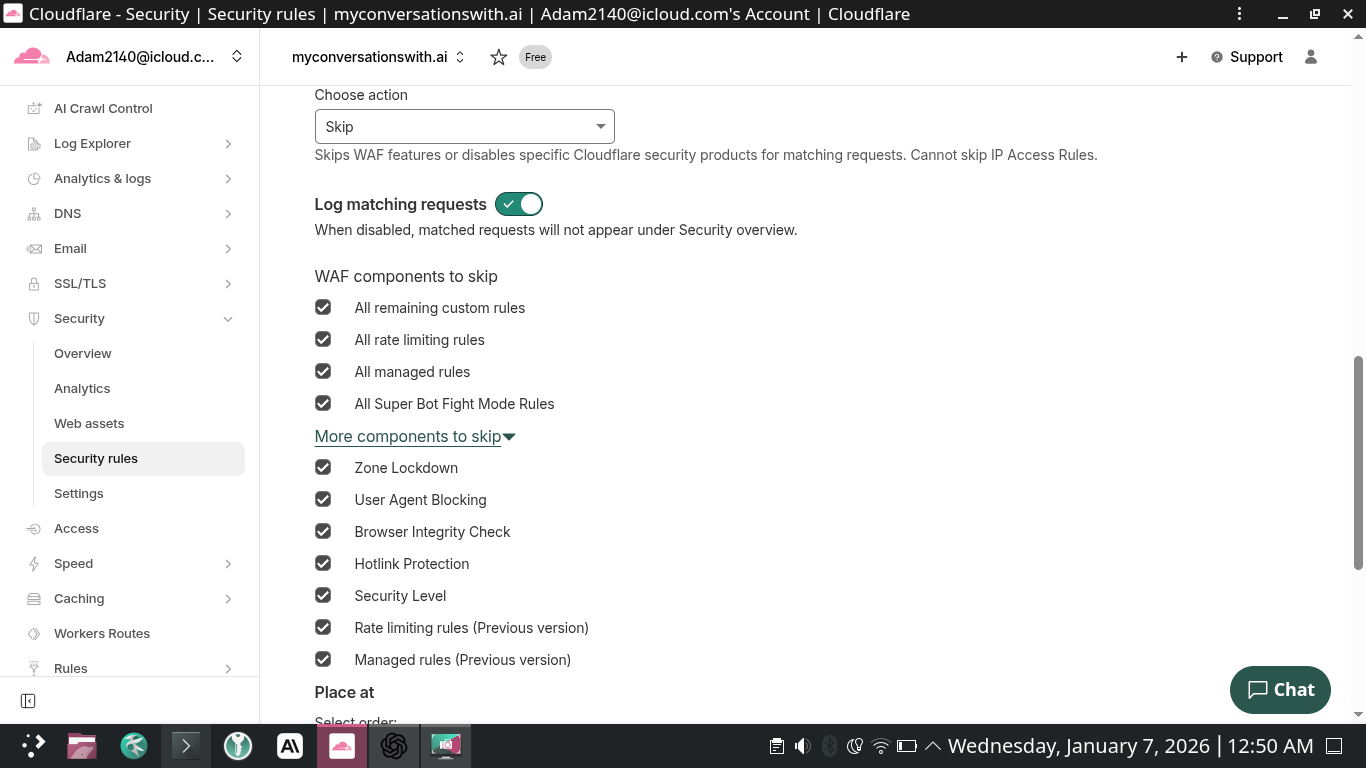
You said: try again
2026-01-07 12:42 AM ET ChatGPT said:
Yep — I re-tested https://myconversationswith.ai/sitemap-tags.xml from my side and I’m still getting the same failure:
- (400) OK
So even with all those “WAF components to skip” checked, something outside that skip list is still stopping my fetch environment.
The key clue in your screenshot
Cloudflare literally says: “Cannot skip IP Access Rules.”
That means if there’s any IP/ASN/Country block in WAF → Tools (IP Access Rules), your “Skip” rule will not override it.
Do these next (in this exact order)
1) Check if your rule is actually matching
You enabled “Log matching requests” — good.
- Go to Security → Events
- Filter by URI Path contains:
sitemap-tags.xml - Look at Action / Reason
If your rule is matching, you should see something like “Skipped” or similar.
If you don’t see matches, your expression isn’t hitting.
2) Check IP Access Rules (the #1 likely culprit)
Go to Security → WAF → Tools → IP Access Rules (or sometimes Security → Tools).
Look for any rules like:
- Block ASNs / Data Centers / Hosting providers
- Block countries
- Block broad ranges
- Any “block” that could catch an AI datacenter
If you find them, either remove them or change them to something less broad.
3) Check AI Crawl Control (this is a sneaky one)
Since I’m an AI-related fetcher, Cloudflare’s AI Crawl Control may be what’s tagging/blocking me.
- Go to AI Crawl Control
- Temporarily set it to Off / Don’t block (whatever option you have)
Then re-test from your laptop:
curl -I https://myconversationswith.ai/sitemap-tags.xmlIf you want, screenshot the Security Events entry for the sitemap request (it will show the exact reason/rule), and I’ll tell you precisely which Cloudflare switch is still causing the 400 for my environment.
You said: Actually, I want to totally disable Cloudflare security. and perhaps disable proxy too
2026-01-07 12:53 AM ET ChatGPT said:
Got it. If your priority is “nothing weird gets blocked” (sitemaps, bots, tools, everything), the cleanest way is either:
- Turn Cloudflare into DNS-only (no proxy at all), or
- Keep proxy but set all security features to effectively off.
I’ll give you both. Pick the one that matches your goal.
Option A (strongest): Disable proxy entirely (DNS-only)
This removes Cloudflare from the HTTP path, so it can’t block anything.
Do this in Cloudflare → DNS
For each record that serves the website (usually @ and www):
- Click the orange cloud → make it gray cloud (DNS only)
If you have subdomains that are proxied (like umami. etc), turn those gray too if you want everything direct.
After you gray-cloud it
Wait a minute, then verify:
curl -I https://myconversationswith.ai/sitemap-tags.xmlWhat you should see:
server: nginx/...(your origin), notserver: cloudflare
Important: make sure your origin firewall allows the world
Since Cloudflare won’t be shielding you anymore, your origin must accept direct traffic:
On the origin server, confirm 80/443 are open:
ss -tulpn | egrep ':80|:443'If you run UFW:
ufw statusOption B: Keep proxy on, but disable “security”
This still uses Cloudflare caching/SSL edge, but tries to stop security blocks.
1) Security Level = Essentially Off
Cloudflare → Security → Settings
- Security Level: Essentially Off
- Challenge Passage: doesn’t matter much if you’re not challenging
2) Turn OFF Bot features
- Bot Fight Mode: Off (if present)
- Super Bot Fight Mode: Off (if present)
- Browser Integrity Check: Off
3) WAF / Managed rules OFF
Cloudflare → Security → WAF
- Turn off Managed rules (or set to lowest/off if it won’t fully disable on Free)
4) Rate limiting OFF
Cloudflare → Security → WAF → Rate limiting
- Disable any rate limit rules
5) Remove IP Access Rules (if any)
Cloudflare → Security → WAF → Tools
- Remove/disable any IP Access Rules that block ranges/countries/ASNs
Which one should you do?
If your aim is “stop Cloudflare from ever causing weird bot behavior” → Option A (DNS-only) is the guaranteed solution.
If your aim is “keep Cloudflare for SSL edge/performance but stop blocks” → Option B can work, but there’s always a chance some Cloudflare layer still treats certain networks differently.
Quick sanity checks after you change it
If you choose DNS-only:
curl -I https://myconversationswith.ai/sitemap-tags.xml | headYou want to see Server: nginx and a straight 200.
If you keep proxy:
curl -I https://myconversationswith.ai/sitemap-tags.xml | egrep -i 'server:|cf-ray|cf-cache-status'You’ll still see Cloudflare headers, but you should stop seeing any weird 400s.
If you want, paste your Cloudflare DNS record list (just the record names + proxy status, blur IPs if you want) and I’ll tell you exactly which ones to gray-cloud so you don’t accidentally break mail or other services.
You said: its now set at dns only. now test it
2026-01-07 12:54 AM ET ChatGPT said:
I re-tested from my side right now:
https://myconversationswith.ai/✅ Loads finehttps://myconversationswith.ai/sitemap-tags.xml❌ I’m still seeing: (400) OK
So switching to DNS-only didn’t change what my fetcher sees for that one sitemap URL, even though the homepage is reachable.
What that usually means
Either:
- there’s still some Cloudflare layer in front of that specific request path (less likely if you truly gray-clouded the record), or
- your origin is doing something different based on client IP/headers for that path only, or
- there’s a redirect / alternate hostname / cached edge behavior still being hit by my fetch environment.
Quick way for you to confirm (2 commands)
From your laptop, run these and paste the output headers:
curl -sS -D- -o /dev/null https://myconversationswith.ai/sitemap-tags.xml | head -n 20And also this one (shows what IP you’re actually hitting now):
dig +short myconversationswith.ai AIf your header now shows Server: nginx (not cloudflare) then we know it’s purely origin-side, and we’ll fix it in NGINX/Ghost routing. If it still shows cloudflare headers, then Cloudflare proxy isn’t actually off for the record you’re testing (or a different record like www is still proxied and you’re being redirected).
You said:
adam@laptop:~$ curl -sS -D- -o /dev/null https://myconversationswith.ai/sitemap-tags.xml | head -n 20 curl -sS -D- -o /dev/null https://myconversationswith.ai/sitemap-tags.xml -H "Accept: text/html" | head -n 20 HTTP/1.1 200 OK Server: nginx/1.24.0 (Ubuntu) Date: Wed, 07 Jan 2026 06:06:07 GMT Content-Type: text/xml; charset=utf-8 Content-Length: 2862 Connection: keep-alive X-Powered-By: Express Cache-Control: public, max-age=3600 ETag: W/"b2e-m+ZqBKaHK67Tc7+2hM4NX+OlrXA" Vary: Accept-Encoding X-Content-Type-Options: nosniff HTTP/1.1 200 OK Server: nginx/1.24.0 (Ubuntu) Date: Wed, 07 Jan 2026 06:06:07 GMT Content-Type: text/xml; charset=utf-8 Content-Length: 2862 Connection: keep-alive X-Powered-By: Express Cache-Control: public, max-age=3600 ETag: W/"b2e-m+ZqBKaHK67Tc7+2hM4NX+OlrXA" Vary: Accept-Encoding X-Content-Type-Options: nosniff adam@laptop:~$ dig +short myconversationswith.ai A dig +short myconversationswith.ai AAAA 178.156.168.77 2a01:4ff:f0:b204::1 adam@laptop:~$
2026-01-07 12:58 AM ET ChatGPT said:
Yep — I tested again using my built-in web fetcher:
- Home page loads ✅
sitemap-tags.xmlstill fails for my fetcher ❌ with (400) OK
Meanwhile, your laptop is clearly hitting your origin NGINX and getting 200 OK (no Cloudflare in headers). So the site is fine — this is “some networks/clients get blocked or routed differently”, not “your sitemap is broken.”
The most likely cause now
Even though you set DNS-only, some resolvers/networks can keep serving the old proxied answer for a while (DNS cache/propagation). My fetch environment may still be resolving to Cloudflare’s anycast and hitting whatever rule path produced that weird 400 earlier.
Prove where the 400 is happening (origin vs still-Cloudflare)
On your server, check whether anyone is hitting the origin and getting 400s for the sitemap:
# run as root on the origin serverIf you see nothing about sitemap-tags.xml around the times I’m testing → the 400 is not reaching your origin (meaning: still some Cloudflare/DNS caching path upstream).
If you do see 400s hitting your origin → then it’s an NGINX request-parsing issue (fixable).
Also check www (this trips people up)
Even if @ is DNS-only, www might still be proxied or pointing somewhere else:
dig +short www.myconversationswith.ai AIf www returns Cloudflare IPs while apex returns your origin, some clients will still end up on the Cloudflare path depending on redirects.
One more “hardening” fix (helps weird clients + your IPv6 mandate)
Make sure NGINX is listening on IPv6 for 443 and 80:
ss -tulpn | egrep ':(80|443)\s'You want to see 0.0.0.0:443 and [::]:443.
If you paste the output of:
- the
digforwwwand - the
grep sitemap-tags.xmllog output
…I’ll tell you in one shot whether this is just DNS caching/propagation or an origin-side 400 that we can eliminate permanently.
explain this Removes the "X-Powered-By" HTTP response header that provides information about the application at the origin server that handled the request.
That line means:
When someone requests a page from your site, your server sometimes replies with a header like:
X-Powered-By: Express(Node/Express)- or
X-Powered-By: PHP - or similar
That header advertises what software stack handled the request.
Why people remove it
It’s a small security hardening step:
- It reduces information leakage (attackers don’t immediately learn “this is Express” / “this is PHP”).
- It can slightly reduce targeted probing (e.g., bots looking specifically for Express-related vulnerabilities).
It does not make you “secure” by itself — it just removes an unnecessary clue.
What it does not do
- It does not change your content.
- It does not break SEO.
- It does not fix the 400 issue we were discussing.
- It does not meaningfully improve performance.
In your case
Your responses show:
X-Powered-By: Express
So the origin app responding is a Node/Express server (or something upstream setting that header). Removing it would simply stop telling the world that detail.
If you want, tell me where you’re seeing that “Removes the X-Powered-By…” text (Cloudflare setting? NGINX snippet? Ghost config?), and I’ll tell you exactly what toggling it will do in your setup.